
If you’re a blogger or content manager, you already know how time-consuming internal linking can be.
First, you identify your pillar content. Then you go from one article to another, looking for linking opportunities.
It doesn’t stop there. You check LSI keywords. Then repeat the same process again.
In most cases, this takes an hour or more for a single article. Then, it became difficult to manage.
That’s when I started using Rank Math Pro and its AI Link Genius feature.
Why Internal Linking Becomes a Problem
Initially, I didn’t see this as a problem.
But once I crossed around 80 articles, things started to change.
Internal linking began to feel like a maze.
Every time I published a new post, I had to go back to older articles and manually add links. It wasn’t just one or two posts. I had to check multiple articles category-wise.
To manage this, I even created an Excel sheet. I started tracking links, anchor text, and LSI variations for every article.
At first, it helped. But over time, the sheet became complex.
I started spending more time managing links than actually writing content.
And even after all that effort, things were still not perfect.
Some posts had no internal links. Some important pages were getting ignored. Anchor texts were inconsistent.
That’s when I realized internal linking is easy at the start, but becomes difficult as your content grows.
What is AI Link Genius in Rank Math?
AI Link Genius is an internal linking feature built inside the Rank Math Pro plugin.
It helps you find linking opportunities, fix broken or missed links, and manage your internal linking structure from one place.
Instead of manually going through each post, it simplifies the process by giving you a more structured way to handle internal links across your website.
How I Use AI Link Genius (Practical Workflow)
The first thing you need to do is make sure you have the Rank Math Pro plugin activated and the Link Genius module enabled.
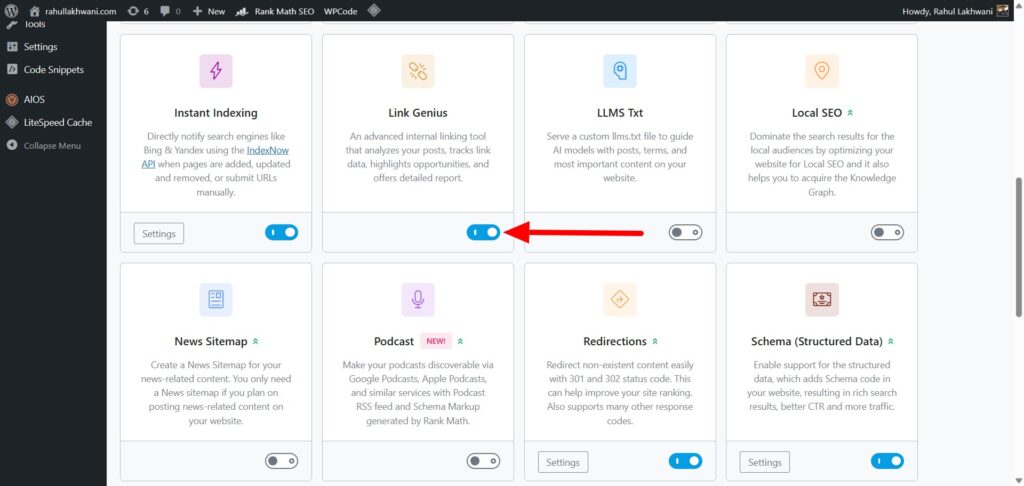
As shown in this screenshot, you’ll find the Link Genius option inside the Rank Math dashboard. Just enable it, and you’re good to go.
Once enabled, head over to the Link Genius dashboard.
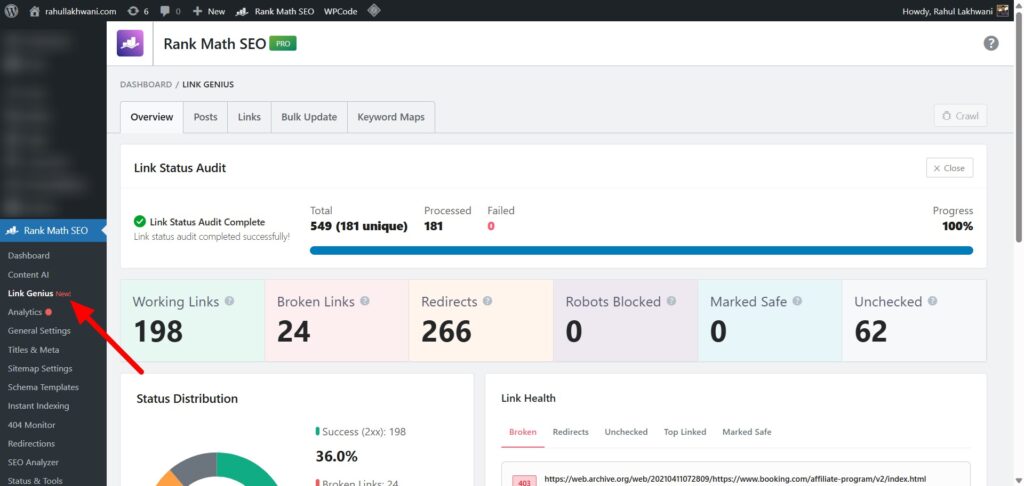
In the above screenshot, you can see a clear overview of your website’s link health. This is where things start getting interesting.
You get a complete breakdown of:
- Working links
- Broken links
- Redirects
- Unchecked links
For me, the most useful part here is the broken links section.
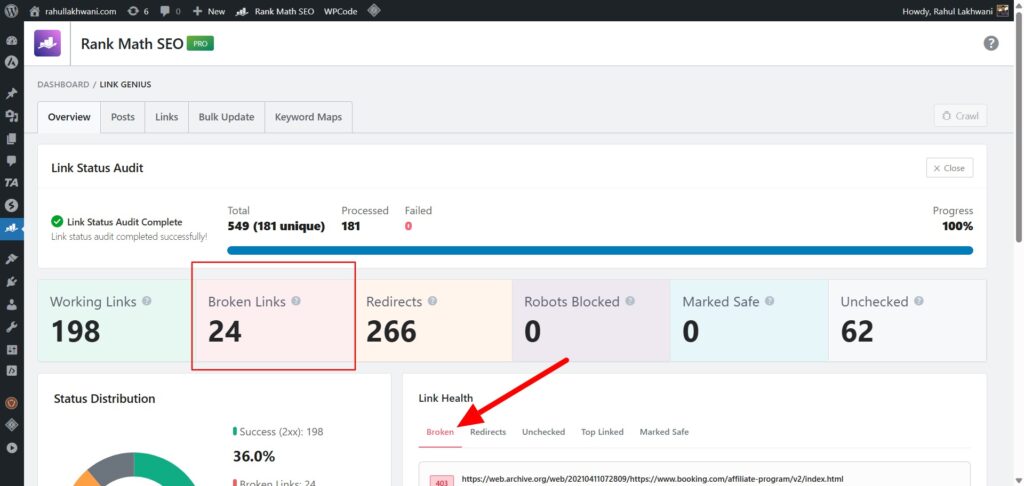
Instead of manually checking posts one by one, I can instantly see how many broken links exist on my site.
Next, as shown in the third screenshot, I simply click on the “Broken” tab.
This filters out everything and shows only the broken links across my website.
Now comes the practical part.
In the fourth screenshot, you can see the “Show Details” option for each link.
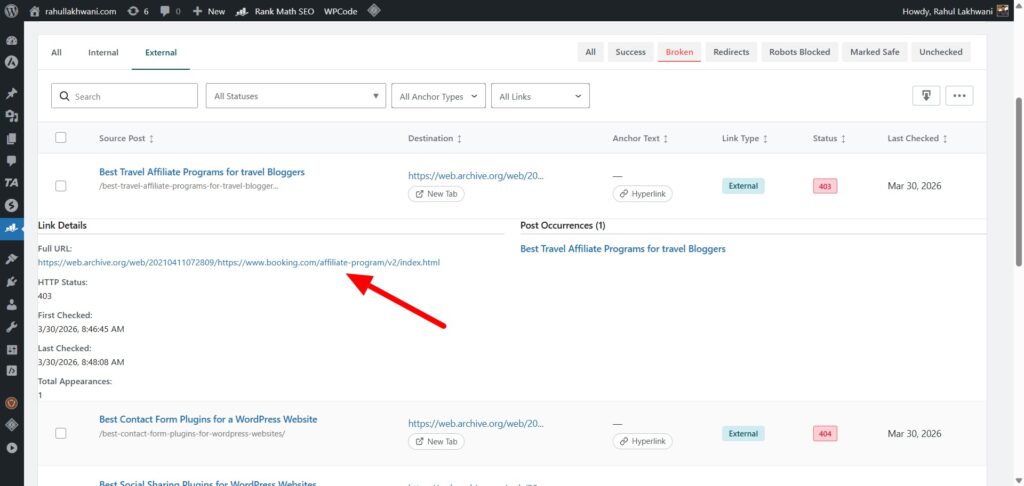
I use this to:
- Check the exact URL
- See the HTTP status (like 403 or 404)
- Identify which post the link is coming from
From here, I directly jump into the post and fix or replace the broken link.
This entire process saves a lot of time.
Earlier, I had to manually open posts and check links. Now, everything is visible in one place, and fixing links becomes much faster.
AI Link Genius Features That Actually Matter
Rank Math’s AI Link Genius comes with a lot of features.
But honestly, not everything is useful on a day-to-day basis.
Here are the ones that I actually use and found helpful.
AI Link Suggestions (Inside Editor)
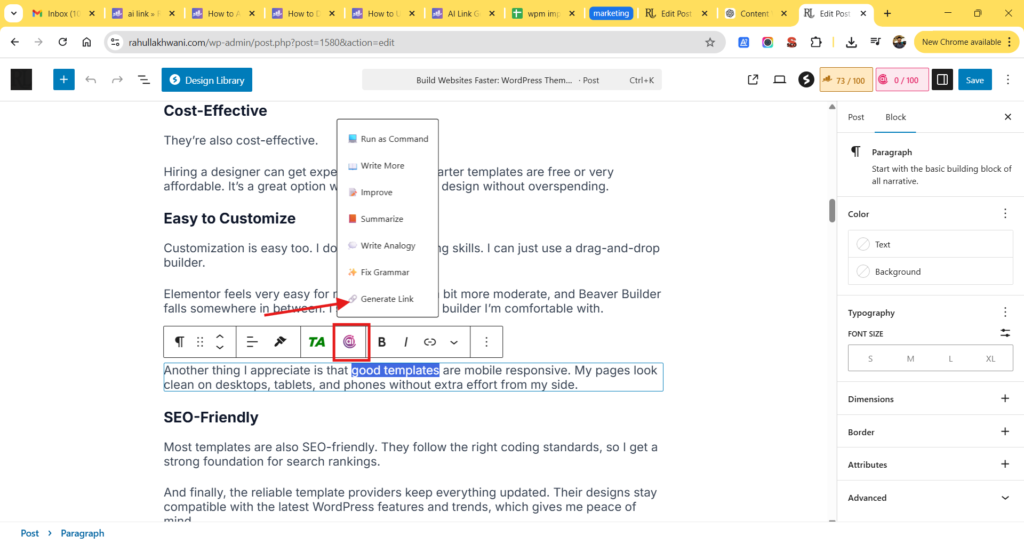
This is a useful feature.
While writing an article, Rank Math automatically suggests internal linking opportunities based on the content.
I don’t have to think too much about which post to link. It gives relevant suggestions, and I can insert links with one click.
It saves a lot of time during the writing process.
Orphan Page Detection
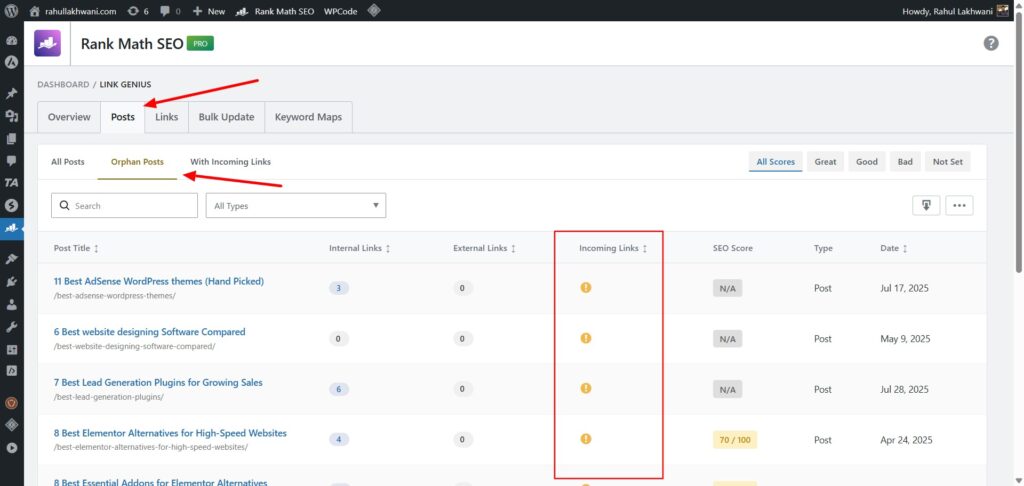
This is something I struggled with earlier.
Some of my posts had zero internal links pointing to them. I didn’t even realize it until traffic dropped.
With AI Link Genius, I can quickly identify orphan pages from the dashboard.
Once I find them, I go back and add relevant internal links to fix the issue.
Bulk Link Update
This is super helpful during site changes.
If you ever change URLs, update anchor text, or fix repeated links, doing it manually can take hours.
With the bulk update feature, I can update links across multiple posts in one go.
There’s also a preview and rollback option, so I don’t worry about breaking anything.
Keyword-Based Linking (Optional but Useful)
This feature helps if you want to push specific pages.
You can assign a keyword to a URL, and Rank Math will suggest linking opportunities based on that keyword.
I don’t use it all the time, but it’s useful for strengthening pillar content.
Link Audit Dashboard
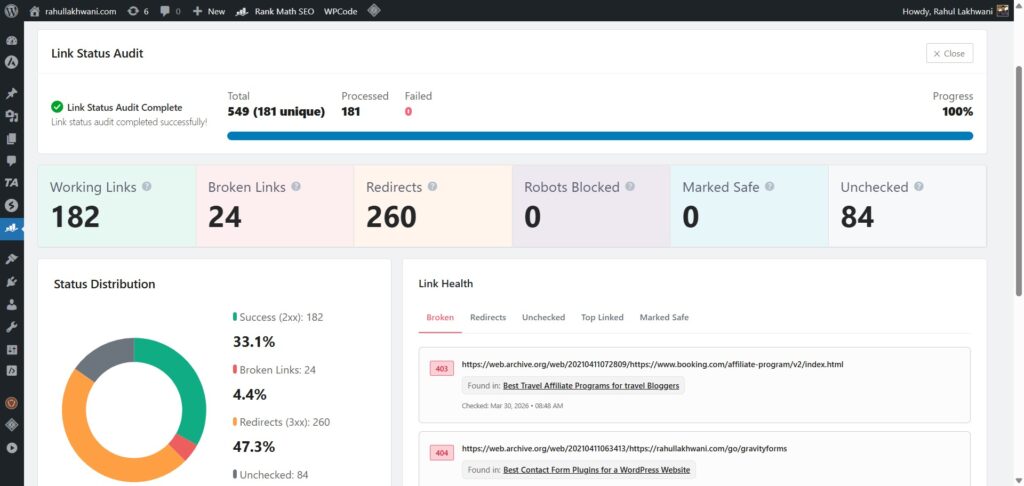
This is where I spend most of my time.
It gives a complete overview of all links on my website.
I can see broken links, redirects, and overall link health in one place.
Earlier, I had to rely on multiple tools. Now everything is inside WordPress.
What I Liked about AI Link Genius (Pros) ✅
- Saves Time: Reduces manual effort required for internal linking
- Finds Missed Opportunities: Suggests relevant internal links automatically
- Better Structure: Helps organize internal links across your site
- Orphan Page Detection: Easily identify pages with no internal links
- Works Inside Editor: Add links while writing without switching tabs
In short, it simplifies internal linking and makes the process more structured as your content grows.
What Could Be Better (Cons)❌
- Needs Manual Review: AI suggestions are helpful but not always perfect
- Learning Curve: Too many features can feel overwhelming initially
- Pro Feature Only: Not available in the free version of Rank Math
- Risk of Over-Linking: Can add too many links if not used carefully
In short, AI link genius powerful, but you still need to use it with control and understanding.
AI Link Genius vs Manual Internal Linking
I’ve tried both approaches.
Manual internal linking works fine when your site is small. You have full control over where you place links and which anchor text you use.
But as your content grows, it becomes difficult to manage.
You start missing linking opportunities. Some pages get too many links, while others get ignored completely.
| Feature | AI Link Genius | Manual Internal Linking |
|---|---|---|
| Time Required | Saves significant time with automation | Time-consuming, especially for large sites |
| Ease of Use | Works inside dashboard and editor | Requires switching between posts |
| Link Discovery | Automatically suggests opportunities | Depends on memory or manual research |
| Scalability | Handles large websites easily | Becomes difficult as content grows |
| Accuracy | Needs manual review for relevance | Full control over link placement |
| Orphan Page Detection | Automatically identifies orphan posts | Hard to track without tools |
| Consistency | Maintains structured linking | Can become inconsistent over time |
| Learning Curve | Slight learning curve initially | Simple but repetitive process |
AI Link Genius solves this problem to a large extent.
It helps you find relevant linking opportunities faster. You don’t have to jump between multiple posts or maintain sheets to track links.
That said, I still don’t rely on AI completely.
Manual review is still important.
I use AI Link Genius to speed up the process, but I always check if the links make sense in the context.
So for me, it’s not AI vs manual.
It’s AI + manual working together.
Who Should Use AI Link Genius
From my experience, this feature is not for everyone.
If you have just started your blog with 5–10 articles, you might not need it immediately. Internal linking is still manageable at that stage.
But once your content starts growing, things change quickly.
AI Link Genius is useful for:
- Bloggers managing 40+ articles
- Content-heavy websites like blogs or news sites
- Affiliate websites with multiple categories
- Anyone struggling to manage internal links manually
I personally found it useful after crossing around 70–80 posts.
That’s when internal linking started becoming difficult to track manually.
Final Verdict
Internal linking is one of those things that looks simple but becomes complicated over time.
That’s exactly where AI Link Genius helps.
Rank Math’s AI Link Genius can significantly improve your productivity when it comes to internal linking. It helps you manage links faster and keeps your on-page SEO more structured.
That said, it’s not a magic solution.
The suggestions are AI-generated, but they still need manual review. You need to check if the links are relevant and match the right intent.
I treat it more like an SEO assistant. It does most of the heavy lifting, but I still review the output before finalizing anything.
If used correctly, it can save a lot of time and make internal linking much easier to manage.
