
Looking for an honest and in-depth Rank Math review to help you choose the right WordPress SEO plugin? This guide is meant to make that decision easier.
Rank Math has quickly emerged as a popular alternative to Yoast SEO. Many WordPress users now consider it for managing on-page SEO tasks more efficiently.
From my experience working with SEO content and ranking multiple websites, one thing is clear. You need a reliable SEO plugin to stay consistent. It should simplify optimization without adding complexity.
But is Rank Math the right fit for your website?
In this Rank Math review, I’ll break down the key features that actually matter. I’ll focus on how they help improve search rankings and drive organic traffic over time.
- What Is Rank Math SEO Plugin?
- Is Rank Math Right for You?
- Why Rank Math Is So Popular
- Key Rank Math Features (That Actually Matter)
- How I Use Rank Math to Optimize a Blog Post
- Rank Math Content AI: Worth It or Not?
- Rank Math Free vs Pro: Real Differences
- Rank Math Pricing: Is Pro Worth Paying For?
- UX & Ease of Use
- Rank Math Pros & Cons
- Best Rank Math Alternatives
- Rank Math vs Yoast vs AIOSEO
- Switching to Rank Math: What to Expect
- Common Rank Math Mistakes to Avoid
- Rank Math FAQs
- Final Verdict: Should You Use Rank Math?
What Is Rank Math SEO Plugin?

Rank Math Pro is a complete SEO plugin for bloggers, business websites, and eCommerce stores. I’ve seen it work well across different types of WordPress setups.
If you’re currently using the Yoast SEO plugin, you’ll notice one clear difference. Many features in Yoast require a Premium upgrade. This includes things like redirects and schema markup.
With Rank Math, a lot of these features are available in the free version. The plugin automatically creates XML sitemaps. It supports more than 18 snippet types. It also manages redirects and gives real-time content scores while you write.
Everything is controlled from a single dashboard. That makes SEO tasks easier to manage without switching between multiple plugins.
The Pro version adds more advanced tools. This includes Content AI, an advanced keyword rank tracker, an advanced llms.txt generator, and an AI search traffic tracker.
Is Rank Math Right for You?
If your business fall into any of the categories below, Rank Math can be a useful SEO plugin for your website.
Bloggers
Rank Math helps bloggers with keyword optimization and content analysis. It provides clear, actionable suggestions to improve articles and increase search visibility.
Recipe Blogs
Rank Math includes built-in recipe schema support. You can enter recipe details once and have them appear as rich results in search engines. This helps improve visibility and click-through rates.
Local Businesses
Local SEO plays a big role in business growth. Rank Math supports local business schema, which helps websites rank for location-based keywords.
You simply add your business details inside the plugin. Rank Math then adds the required metadata automatically, improving your chances of appearing in local search results.
eCommerce Stores
Rank Math works well with WooCommerce. Together, they make it easier to optimize product pages and category pages for search engines.
It also integrates smoothly with Easy Digital Downloads. This makes it a solid choice for selling online courses, ebooks, and other digital products while driving organic traffic to your site.
Why Rank Math Is So Popular
As mentioned earlier, one of the main reasons behind Rank Math’s popularity is its free version. It includes many features that other SEO plugins reserve for paid plans.
Another factor is onboarding and usability. Rank Math is easier to set up, and its interface feels more modern. For a long time, Yoast did not significantly update its UI or improve the overall user experience. That gap likely pushed users to explore alternatives.
In the early days, Rank Math offered similar on-page SEO features as Yoast. However, its cleaner UI and smoother UX made it feel more approachable. This alone attracted many users.
Rank Math also evolved faster when it came to AI-based features. Its premium plans introduced AI-driven tools earlier than many competing SEO plugins.
From a pricing perspective, Rank Math stands out as well. The plans are more affordable. For many users, it’s cheaper than relying on a combination of multiple SEO plugins to get the same feature set.
Key Rank Math Features (That Actually Matter)
Free Plugin 🆓
One of the biggest advantages is that these core features are available for free. You don’t need to upgrade just to access essential SEO tools.
SEO Analyzer 🤔
Rank Math runs both content and technical SEO audits. It highlights issues and gives clear suggestions to improve overall SEO performance.
Optimize for Up to 5 Keywords 😀
You can optimize each post for up to five focus keywords. This helps target multiple search terms from a single piece of content.
One-Click Import From Yoast 🔁
Migrating from Yoast is simple. With one click, Rank Math imports your existing SEO settings without manual work.
Google Search Console Integration
Rank Math connects directly with Google Search Console. You can identify technical SEO issues without leaving your WordPress dashboard.
Full Schema Support 💪
The plugin includes built-in schema options. This makes it easy to enable rich snippets and improve search appearance.
How I Use Rank Math to Optimize a Blog Post
From my experience as a marketer, I’ve learned that writing content is only half of the SEO process. The other half is proper optimization.
Before moving to off-page SEO, I always focus on on-page SEO first. This step plays a major role in ranking articles on search engines like Google and Bing.
That’s where Rank Math helps me the most. It simplifies on-page SEO and keeps everything inside the WordPress editor. While it’s similar to Yoast SEO in many ways, Rank Math goes a step further by offering more optimization options.
Let me show you how I use Rank Math for on-page SEO.
I start by opening the post or page I’m working on. Then I click on the Rank Math box located in the top-right corner of the block editor.
Once the Rank Math settings are visible, I begin with the basics. I add an SEO-friendly title, a clean URL, and a compelling meta description. The goal is to encourage users to click when the page appears in search results.
Meta tags are important because they help search engines understand what the page is about. They also influence click-through rates.
From the General settings, I click on Edit Snippet to make changes.
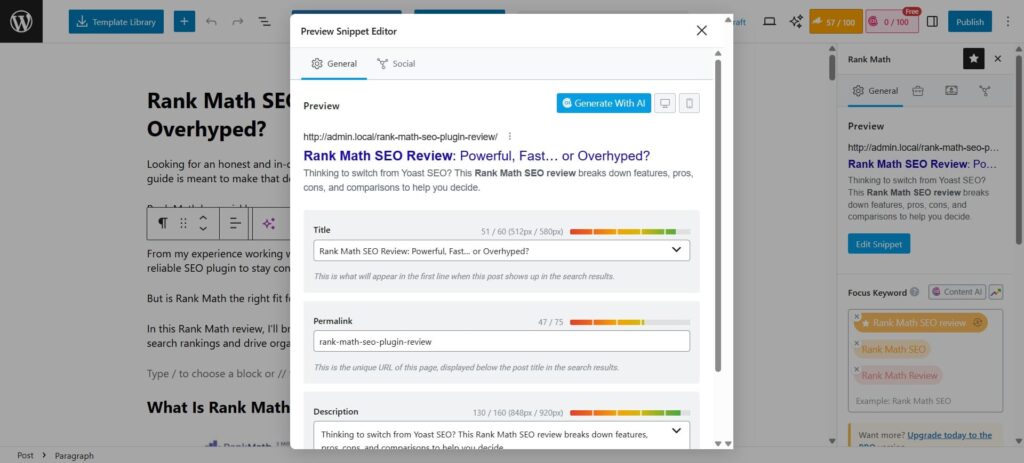
This opens the Preview Snippet Editor.
Here, I edit the title and meta description while keeping the character length within Rank Math’s recommendations for best results.
What’s Different in Rank Math On-Page Settings Compared to Yoast?
One major difference is keyword optimization.
Yoast allows only one focus keyword per post in its free version 😥
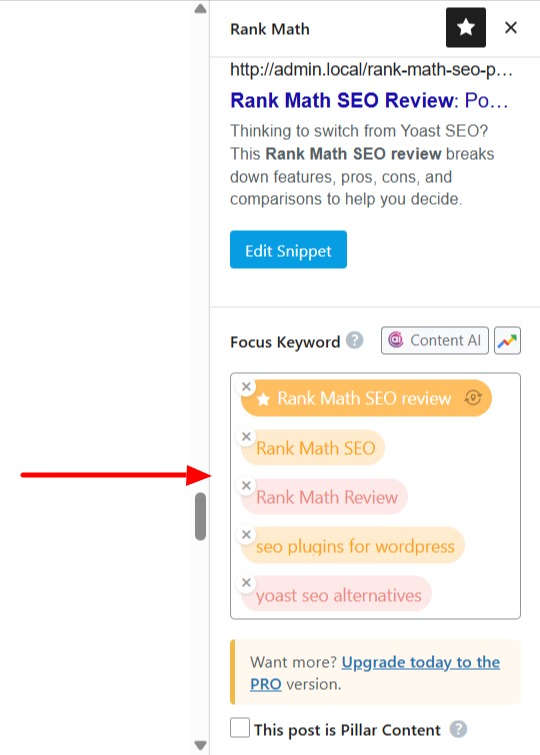
Rank Math lets you optimize for up to five keywords per post. You can increase this limit further by upgrading to a premium plan.
Another difference is schema control. Both Rank Math and Yoast allow you to set basic schema types in their free versions.
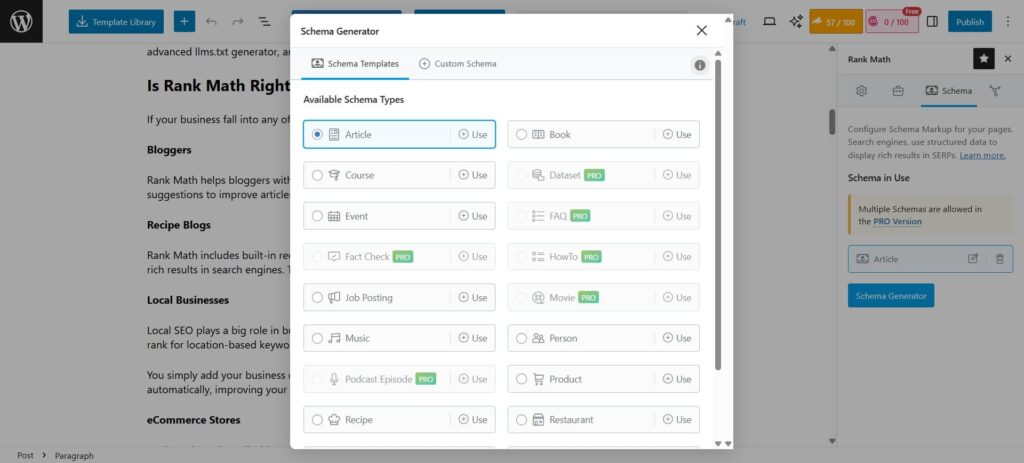
However, Rank Math gives more flexibility with schema customization. With its paid plans, you can add custom schema types that go beyond the default options.
Rank Math Content AI: Worth It or Not?
Once you optimize your post with the on-page suggestions, you can go ahead and check the Content AI suggestions located adjacent to the SEO tab in the toolbar.
First, make sure you’ve enabled the module in the plugin.
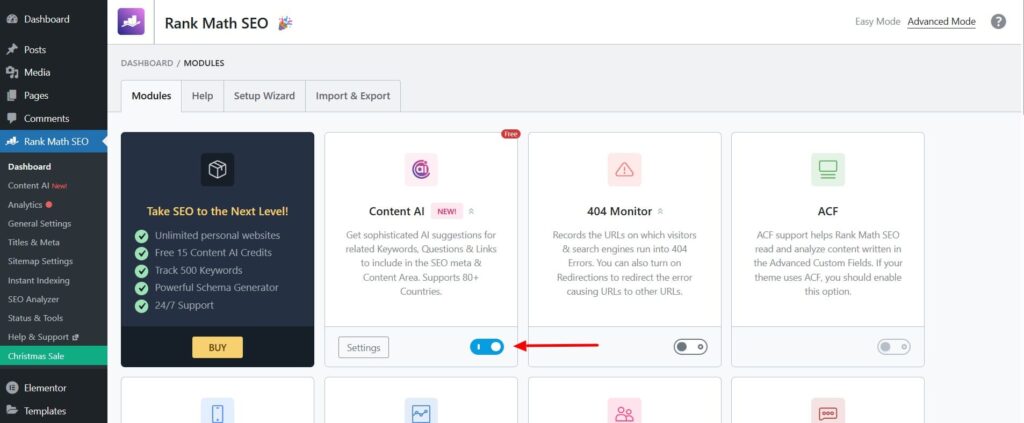
Rank Math Content AI is designed to improve content quality, not just SEO scores.
I’ve found it easy to use, even for beginners. The suggestions are simple and actionable.
Most SEO tools focus heavily on keywords. Content AI goes beyond that. It also helps make content more engaging and reader-friendly.
While traditional SEO scores mainly look at keywords, meta tags, and technical factors, Content AI evaluates more than just optimization. It checks how relevant and engaging the content feels to real users.
I will spend more time on using the Content AI feature and write a detailed article so keep an eye on the upcoming articles.
In simple terms, Content AI helps keep visitors on your website longer. That matters because no one wants readers to leave a 2,000-word article within a few seconds of landing on the page.
Rank Math Free vs Pro: Real Differences
Let’s see what do you get in the free plugin version vs Rank Math Pro plan.
🆓 Free Version (Core Features)
- Includes essential SEO tools like
- multi-keyword optimization,
- XML sitemaps,
- schema support,
- redirects,
- and Google Search Console integration.
- Great for most blogs and small business sites without added cost.
📈 Pro Plan (Paid Upgrade)
- Unlimited personal site usage (free version only supports basic SEO).
- Keyword Rank Tracker (tracks up to ~1,000 keywords).
- Powerful Schema Generator with more control and templates.
- Advanced llms.txt Generator and AI Search Traffic tracking.
- 24/7 Support included with the paid plan.
- In short, the Pro plan adds more automation, analytics, keyword tracking, and support, making it easier to scale SEO efforts beyond the basics.
| Feature | Free | Pro |
|---|---|---|
| Advanced Google Analytics 4 Integration | ❌ | ✅ |
| Keyword Rank Tracker | ❌ | ✅ |
| Tracked Keywords | ❌ | ✅ (Up to 1,000) |
| Free Content AI Trial with Credits | ❌ | ✅ |
| AI Search Traffic Tracker | ❌ | ✅ |
| Track Google Index Status | ⚠️ Limited | ✅ |
| Advanced Schema Generator | ❌ | ✅ |
| SEO Performance Email Reports | ⚠️ Limited | ✅ |
| White Labeled Email Reports | ❌ | ❌ |
| Import Schema from Any Website | ❌ | ✅ |
| Speakable Schema | ❌ | ✅ |
| Google Trends Integration | ❌ | ✅ |
| Google News SEO Sitemap | ❌ | ✅ |
| Google Video SEO Sitemap | ❌ | ✅ |
| Image SEO Pro | ❌ | ✅ |
| Local SEO Pro (Multiple Locations) | ❌ | ✅ |
| WooCommerce SEO Pro | ❌ | ✅ |
| Easy Digital Downloads (EDD) SEO | ❌ | ✅ |
You can check the complete comparison in this video:
In short, the free version covers core SEO needs, but Rank Math Pro unlocks advanced tracking, AI tools, schema options, and eCommerce-focused features that are useful for growing websites.
💼 Higher Plans – Business / Agency
- Business plan supports more client websites and advanced keyword limits.
- Agency plan is aimed at large teams and agencies with very high keyword tracking and client site limits.
- The Business/Agency plans expand usage for multiple clients and larger tracking needs.
Rank Math Pricing: Is Pro Worth Paying For?
Rank Math SEO comes with multiple pricing options to fit different needs. There’s a free version available, which includes the essential features needed for basic SEO optimization.

For more advanced requirements, Rank Math offers three premium plans.
1️⃣Free Plan – Includes essential features for basic SEO optimization
2️⃣Pro Plan – Starts at $6.99 per month, suitable for individual bloggers
3️⃣Business Plan – Priced at $20.99 per month, ideal for small businesses
4️⃣Agency Plan – Starts at $49.99 per month, designed for agencies managing multiple websites
UX & Ease of Use
Rank Math’s setup wizard makes a beginner’s life genuinely easier.
I found it very useful for getting started quickly without having to dig into dozens of settings right away.
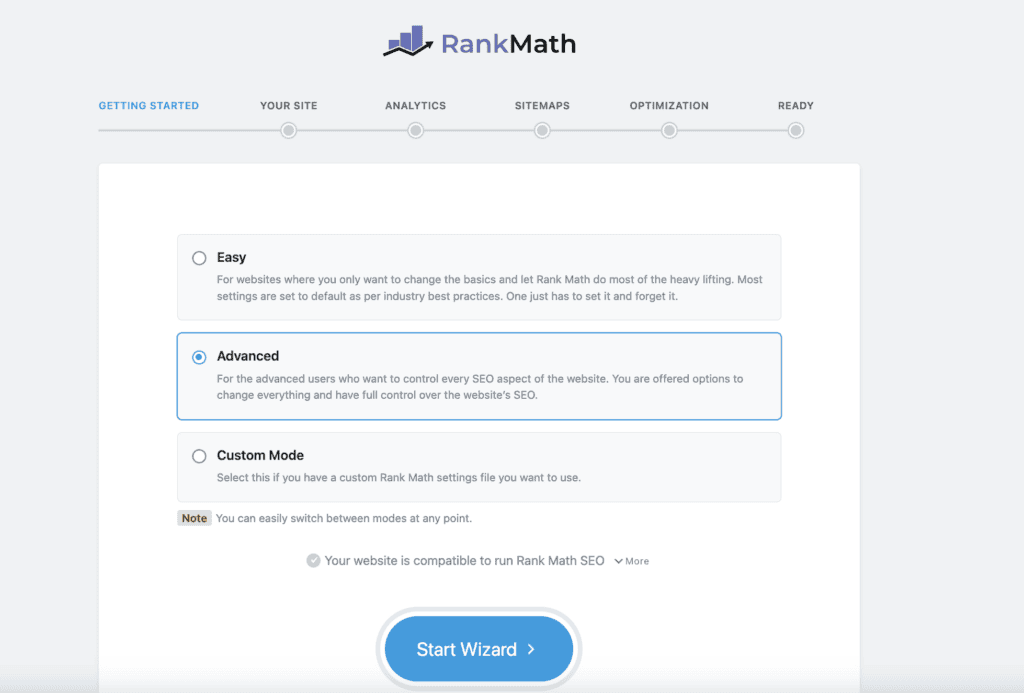
At a high level, the wizard covers most of the essential SEO configurations required for a website or blog, which is perfect when you’re onboarding a new site or working with a team that includes beginner SEOs.
What I particularly liked is how this setup eliminates small but recurring irritation points that usually come up when working with newbie SEO writers.
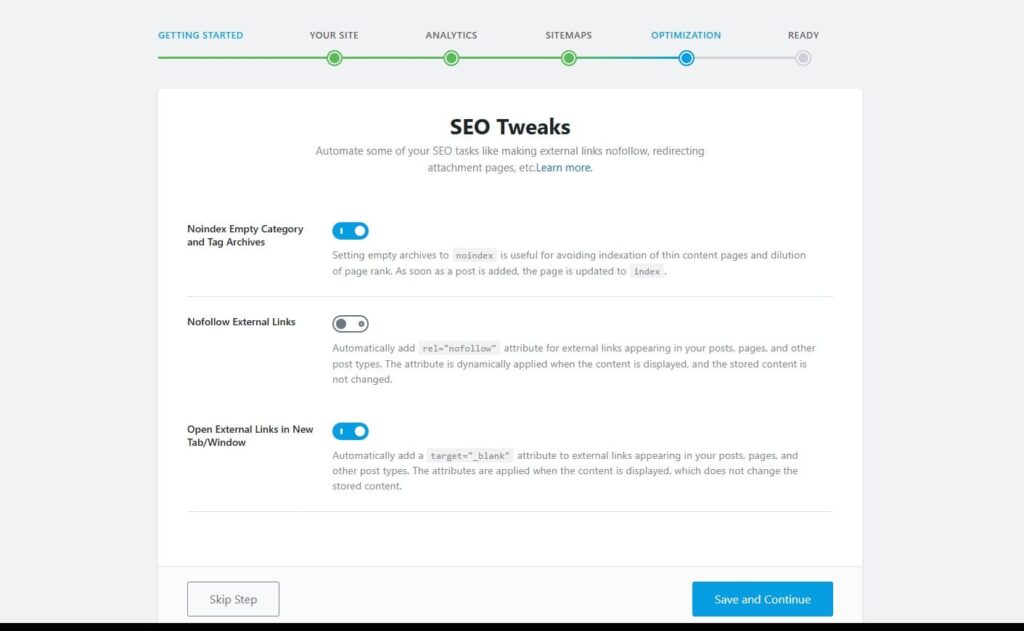
One feature I personally found very helpful is:
- Nofollow External Links
- Open External Links in a New Tab
(Available in Setup Wizard → SEO Optimization step)
I’ve worked with multiple SEO writers, and even after giving instructions several times, they often forget to mark external links as nofollow
This single global setting solves that problem at the content level. Once enabled, all external links are automatically set to nofollow, which means I no longer have to inspect every link manually.
As a result, it saves me a lot of time, reduces unnecessary back-and-forth, and honestly keeps me from getting agitated with writers! win-win 😄
Rank Math SEO Modules
Once you’re done with the setup, head over to the Rank Math plugin > Dashboard. Here you will find a lot of SEO modules.
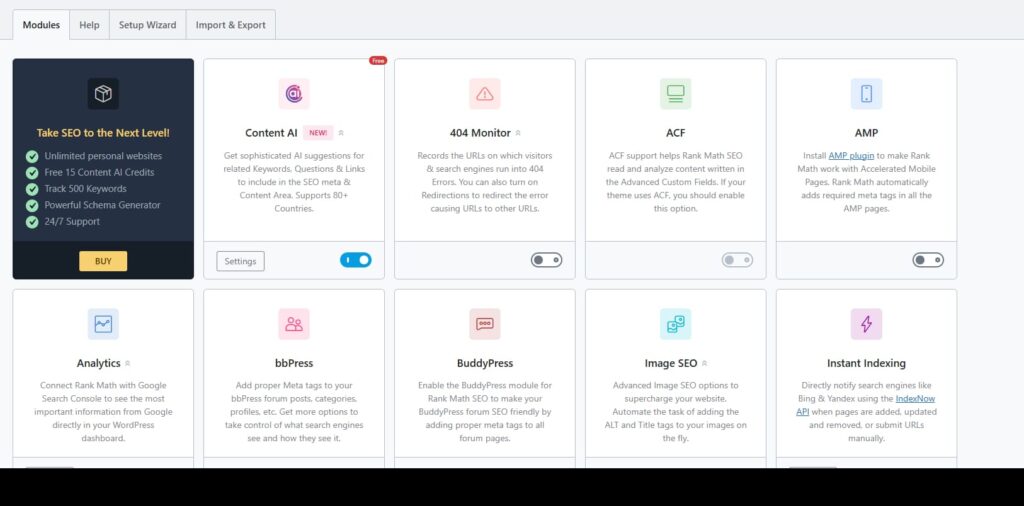
The could thing is that the plugin offers most of its features in a modular format.
I found this useful because you can easily disable anything you don’t need at a given time. This keeps the dashboard cleaner and avoids unnecessary clutter.
That said, the number of available modules can feel overwhelming at first. 😥
If you’re a beginner you may need some time to understand what each module does before deciding which ones to keep enabled.
Again as a newbie website owner, you’ll most probably need these modules:
- 404 Monitor
- Image SEO
- Link Counter
- Redirections
- Sitemap
- Schema(Structured Data)
I’ve found these to be practical and easy to manage if you’re running a content website like a blog or a news website.
As your website grows, you can enable additional modules based on your niche.For example, if you run a local business, the Local SEO module makes sense.
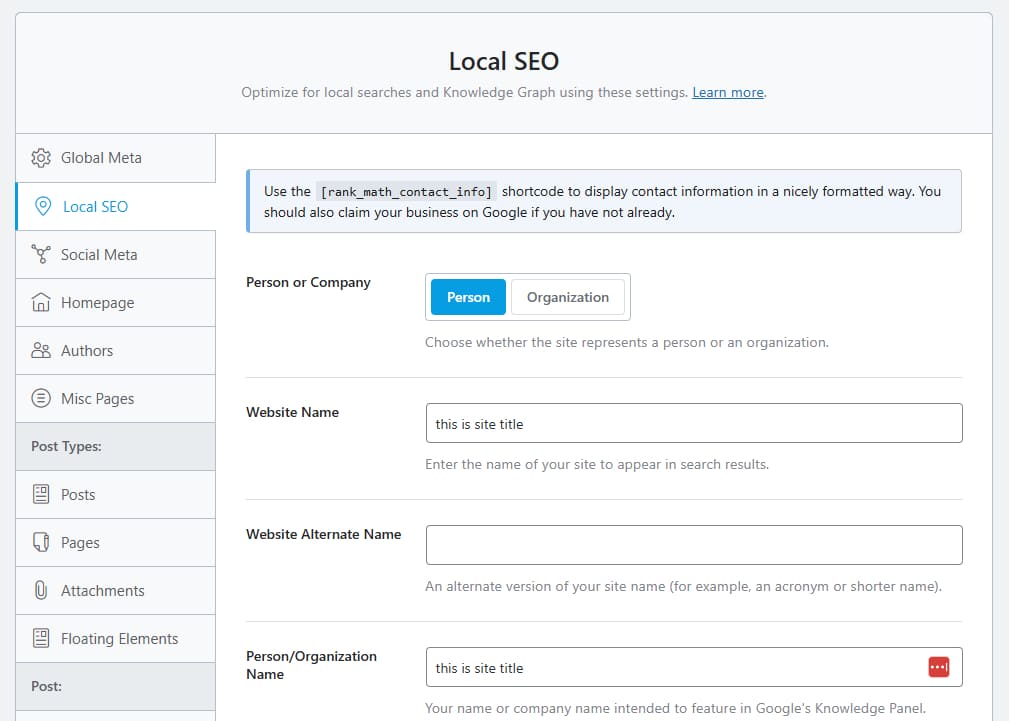
Similarly, if you’re managing an eCommerce store on WooCommerce, activating the WooCommerce module will be more relevant.
The plugin’s General Settings also include a few features that are genuinely useful in day-to-day content publishing.
One feature I liked is the built-in Table of Contents block.
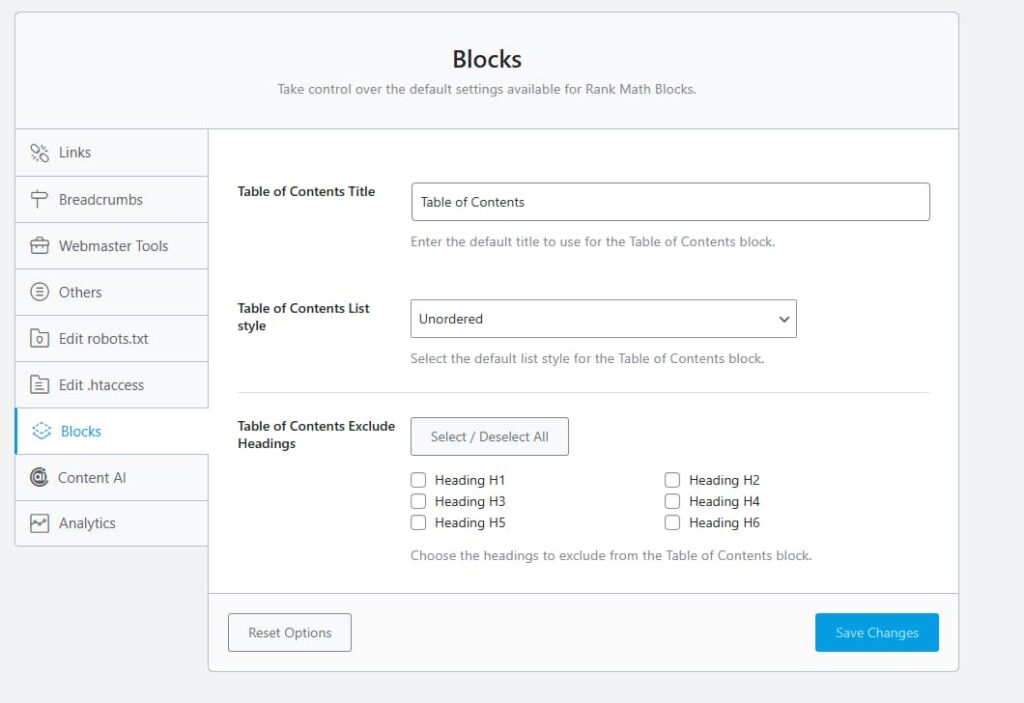
It works well for long-form articles and helps improve readability. More importantly, it removes the need to install a separate plugin just to add a table of contents, which keeps the setup cleaner and lighter.
Overall Rank Math plugin is easy to undersand and you’ll defintely get your hands-on in a matter of days.
Rank Math Pros & Cons
Pros ✅
- Free version available for basic SEO – The free version covers most essential SEO features needed to optimize a standard WordPress website.
- Easy setup – The setup wizard guides you step by step, making it suitable even for beginners.
- Tons of features – It includes tools like schema markup, sitemaps, redirects, and on-page analysis in a single plugin.
- Easy to import settings – You can quickly migrate SEO settings from plugins like Yoast without manual configuration.
- Optimization for up to 5 keywords – Unlike many competitors, Rank Math allows multiple focus keywords without requiring a paid upgrade.
Cons ❌
- Limited human support – Most support interactions start with an AI bot, which can be frustrating when you need direct human assistance.
- Billing and refund complaints – Some users have reported issues like unauthorized charges, unclear cancellations, and difficulty getting refunds.
- Content AI issues – A few users have experienced inconsistent results or technical problems while using the Content AI feature.
- Too many features can feel bloated – With so many tools enabled by default, Rank Math can feel heavy and may affect site performance if not configured properly.
Best Rank Math Alternatives
Although Rank Math is a powerful SEO plugin, it may not be the right choice for everyone. Different websites have different SEO needs.
There are several strong WordPress SEO plugins available today. Below are some popular alternatives to Rank Math that can help improve search rankings.
1. Yoast SEO

Yoast SEO is one of the most widely used SEO plugins for WordPress. It helps optimize content for search engines using essential on-page features like keyword optimization.
The free version of Yoast SEO covers the basics. It includes content analysis, XML sitemaps, and control over titles and meta descriptions.
The premium version adds more advanced features. This includes seamless schema integration, internal link suggestions, a redirect manager, and full access to the Yoast Academy.
2. AIOSEO (All in One SEO)

AIOSEO is another popular alternative. It offers a complete set of SEO tools, including a link assistant, keyword optimization, a Robots.txt editor, and social media integration.
It also includes an AI Writing Assistant. This tool helps optimize content while you write. It provides keyword suggestions, competitor insights, and examples from top-ranking pages.
3. SEOPress

SEOPress is a feature-rich SEO plugin for WordPress. It helps optimize on-page SEO, improve traffic, and enhance social sharing.
The plugin supports custom HTML and XML sitemaps, optimized breadcrumbs, schema markup, and 301 redirections. It’s a good option for users who want strong SEO features with more control.
Rank Math vs Yoast vs AIOSEO
| Feature | Rank Math | Yoast SEO | AIOSEO |
|---|---|---|---|
| Free Version Strength | ⭐⭐⭐⭐⭐ | ⭐⭐⭐ | ⭐⭐⭐⭐ |
| Focus Keywords (Free) | Unlimited | 1 | Limited |
| Built-in Schema | Yes (Advanced) | Limited | Yes |
| Content AI / Suggestions | Yes | No | No |
| SEO Score / Checklist | Yes | Yes | Yes |
| Redirection Manager | Yes (Free) | Pro Only | Pro Only |
| 404 Monitor | Yes | No | Yes (Pro) |
| Rank Tracking | Yes (Pro) | No | Yes (Pro) |
| Google Analytics Integration | Built-in | Limited | Built-in |
| Ease of Use | Moderate | Easy | Easy |
| Best For | Bloggers & power users | Beginners | Businesses |
| Pricing (Pro) | Competitive | Higher | Mid-range |
Switching to Rank Math: What to Expect
Switching from Yoast SEO to Rank Math is fairly straightforward. I found the process to be simple and beginner-friendly.
Rank Math automatically detects your existing SEO setup. During installation, it gives you the option to import settings from popular SEO plugins, including Yoast. This can be done with just one click.
The Setup Wizard walks you through the entire migration process. It imports your SEO titles, meta descriptions, focus keywords, redirects, and other important settings without manual work.
This means your existing posts and pages remain intact. There’s usually no negative impact on rankings when the migration is done correctly.
However, some users have shared their experiences in the WordPress and SEO community.

You can also check this Reddit discussion for real-world feedback from users who switched from Yoast to Rank Math.
That said, I always recommend taking a full website backup before switching SEO plugins. It’s a small precaution that can save a lot of trouble if something unexpected happens.
Common Rank Math Mistakes to Avoid
Here are my two suggestions.
First,
When using Rank Math, one common mistake is getting carried away by the number of available modules.
If you’re new to SEO, it’s better not to enable or tweak every setting. Incorrect configuration can do more harm than good and may negatively impact your website’s performance.
And second,
I often see users rushing to upgrade to the Pro version of any plugin. The free version of Rank Math already offers more than enough features for most beginners.
It’s better to get comfortable with the core modules first and upgrade only when you clearly understand what additional features you actually need.
Rank Math FAQs
Rank Math includes many features in its free version that are only available in Yoast’s paid plans.
Both plugins work well for SEO. But in my experience, Rank Math offers more tools for content optimization, schema markup, and site analysis without requiring an upgrade.
That said, the right choice still depends on your needs. It also depends on how comfortable you are with SEO tools and settings.
Rank Math provides 24×7×365 support through its support forum. Users can raise issues there and get help, even for smaller problems.
The plugin also has a strong reputation for customer support. With over 700 reviews on Trustpilot and an average rating of 4.5, it’s clear that many users have had a positive support experience.
Overall, support availability is another area where Rank Math performs reliably.
Rank Math has been tested with a wide range of WordPress themes. It works well with all popular themes and does not cause compatibility issues in most setups.
Rank Math is optimized for performance. Even with a wide range of features, the plugin remains lightweight and efficient.
It’s built with clean code and optimized database queries. This helps minimize any impact on your website’s loading speed.
Yes, it’s technically possible to install both Rank Math and Yoast SEO on the same WordPress website.
However, I don’t recommend using multiple SEO plugins at the same time. They often overlap in functionality. This can lead to conflicts, duplicate metadata, and unexpected SEO issues.
Final Verdict: Should You Use Rank Math?
Rank Math is a solid SEO plugin choice for WordPress users at different experience levels. It has a large active install base, which shows strong community trust and regular development.
One of its biggest advantages is the free version. It includes many features that other SEO plugins lock behind paid plans. This makes Rank Math especially useful for bloggers and small website owners who want advanced SEO tools without extra cost.
Overall, Rank Math plugin offers good value, flexibility, and scalability as your site grows.
If you’re looking for a feature-rich SEO plugin without paying upfront, Rank Math SEO plugin is worth trying on your WordPress site today.
Recommended Reading:
